Authentication and Authorization
Follow the links below to learn how to authenticate and authorize to:
Authentication and Authorization to the ServiceChannel API
We use the OAuth 2.0 protocol for authentication and authorization. Two grant types are supported: authorization code and resource owner password credentials.
Note: Check the OAuth 2.0 official portal and OAuth 2.0 Authorization Framework document to learn more about this protocol.
Follow this guide to learn how to authenticate your app and access the ServiceChannel API.
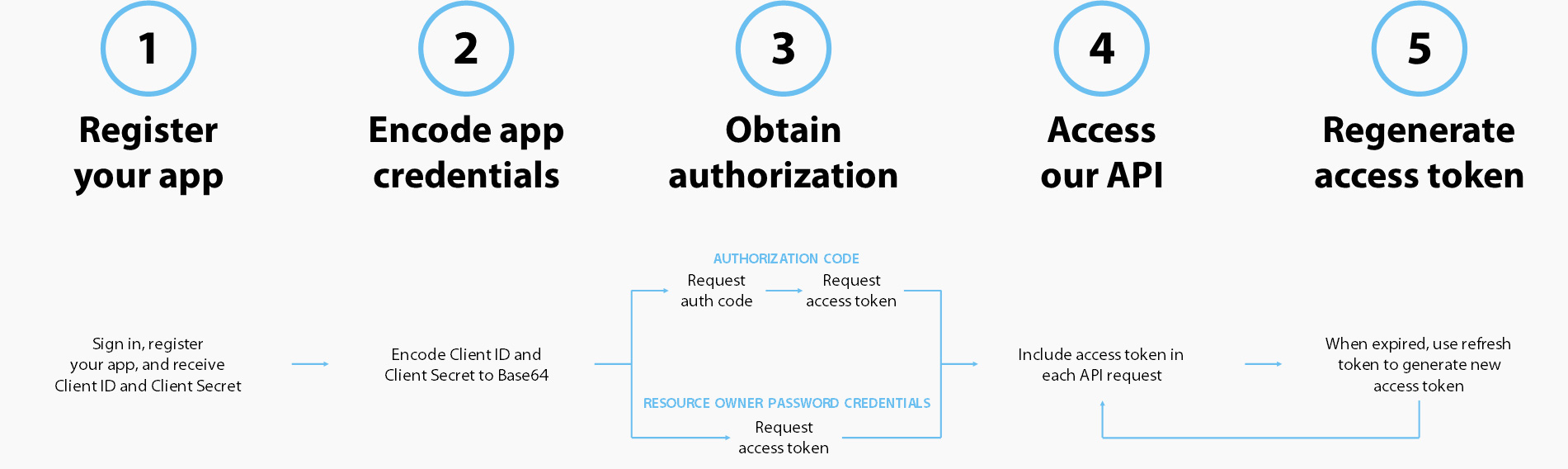
Note: To obtain authorization in the Production environment, use the https://login.servicechannel.com/oauth/token endpoint instead of https://sb2login.servicechannel.com/oauth/token which refers to the Sandbox2 environment.
Step 1. Register Your App
Register your application to get client_id, client_secret, and callback URI.
See App Registration for detailed instructions.
Step 2. Encode App Credentials
Encode your application OAuth credentials to securely use them in the next step. Combine your client_id and client_secret, separate them with a colon :, and Base64 encode the combined values.
To encode client_id and client_secret:
- Open any base64 encoder, for example, base64encode.org.
-
Insert
client_id:client_secretinto the field, and click ENCODE. Here is an input example:SB.2014917243.70943550-9974-41E7-8B38-CA8C8C024262:1C600CB7-4D24-4787-BB3E-ACD2B2FBF745Important: Make sure there are no spaces or other unnecessary characters in the input field.
-
Save the encoded string — you will need it in the next step. This is our output example:
U0IuMjAxNDkxNzI0My43MDk0MzU1MC05OTc0LTQxRTctOEIzOC1DQThDOEMwMjQyNjI6MUM2MDBDQjctNEQyNC00Nzg3LUJCM0UtQUNEMkIyRkJGNzQ1
Step 3. Obtain Authorization
Choose between two grant types to obtain authorization:
Resource Owner Password Credentials
Use this grant type when you have the resource owner credentials: username and password for the ServiceChannel account. Exchange these credentials for access_token.
Request access_token
Important: To get a successful response, enter your owner password credentials only in the body of the request.
To get access_token, send a POST request:
POST /oauth/token
| Header | Value | Note |
|---|---|---|
| Authorization | Basic {encoded client_id:client_secret} |
Replace with your encoded client_id:client_secret |
| Content-Type | application/x-www-form-urlencoded |
| Parameter | Parameter type | Value | Note |
|---|---|---|---|
| username | Body | SC-Dev1 | Replace with your username |
| password | Body | servicechannel1 | Replace with your password |
| grant_type | Body | password |
Example request:
POST https://sb2login.servicechannel.com/oauth/token HTTP/1.1
Authorization: Basic U0IuMjAxNDkxNzI0My43MDk0MzU1MC05OTc0LTQxRTctOEIzOC1DQThDOEMwMjQyNjI6MUM2MDBDQjctNEQyNC00Nzg3LUJCM0UtQUNEMkIyRkJGNzQ1
Content-Type: application/x-www-form-urlencoded

username=SC-Dev1&password=servicechannel1&grant_type=password
Example response:
{
   "access_token": "AAEAAI44ctDQrQ007-wz-r0IyNgUCgz1QAaqbYqhmh30LuOfccRds-OLhwVPg4LDm2m4VR_OIoKiqJzOa8BRPb00pYqZikB11pRP71ttkp6oi6urPYwzT09wJKkXkfc6kT1z5888K7TtEhI3WjUF-rg_LLhQSDswsgfuulDXuKSy6dBVlIdpTf8hxRjiPSPvdJh8djuG-jPTXiss6XIo6RYMi35koX1wSPpRo6xwydpDHLpY6MztSbcjeqoYKmdYk8mP8SpOwQZjZRkdvBre88oyIuIbbtn9Letu-4V4JZygY5vgkrdbXAK7bZnRtUE06i8D9z0XAmOrmpKSlYjcaSnY1wv0AQAAAAEAAAJLJPJwWr7YwN7yv6LkOAydQqsfYFta5wFgcFZR0P8qXXGIHp6lt3HFVmGFXWeXOR_6ny6jPaKxop9uEyCl_v2pYWdLebcOaS1KZhpJVqA-b17e3ZFwKTtr3fdXw2mPo5NYsQCRPPGpxphCjcQI_bsidXHsZpiVdYGtQrVdkcZcDxoN1mkwzKWnrjsFPFHKIU251AUmRZYgLcjKhAqYy-0E7Gg5mKwcHL0D2_UUie4om1CHaLBiyHQnVWbSZ5ccjllh2SWxtuiuQI4IM0z_8IuZrVKh3KarMjBeSGsWAKELnGUvoZUahPq5tsQrdph8U1gAhyeoJg3HshXlXI3szX-0bMXqm0r4px4Hz58xSDR6W_SPnbefZwp_lD-dUlDewbdaOMGY32zgZlpz8dF3zOkTkdOQShpDjO_egktdj_zX0k9VH1N_TgGfZWtb_40ihvvydDncycwvieITRc3r29mxjdo65bPl0diJYMhKRVnr-hd9ZBQQtEdBwvMPq0hNbokXaIsFy9tyy5v7f-O4ozulAcjTcbzeU1K6zbPX5HPIvfb3YtyqOGDDp-YbiH7bHkZlM6_s56zXEJKF0h37VR66lBuFHcRwe1coaSjI2-REv4PqqFYd5qrOocyhwvAlJrY8gU5LWBAIISC0aTE5pl8",
   "token_type": "bearer",
   "expires_in": 600,
   "refresh_token": "gDoX!IAAAABzoOUZoBUUClEEOpCf3xYKU55aGu3FaKPg5hxqkwPTN0QAAAAF73mjZxMcbK5vEoV0NxWzyvZf360UzacuRN-J5KWmL6gQYVwwMy6xR7bzMGm7AbNJtL52ydc2vKXIj3D5dqILIHFZfoI0igTlvwkYtvChkCAh-ocRRGqTVb2n2KKvhUFTZnrTInMG5K313YPdPP21yPUJIF442VabkkRrADN2X6rrlZGIe9vKtJfUnnJdMRs-TvsGQLBulBNx5FxvFlj1sWB92wE2L-ns_OKyMDT0p0f3EoBVsH2rgtrSiX7JVgGAFoCUA3LZO_y-fGE4deLJq"
}
Response code: HTTP/1.1 200 OK
The response body contains access_token that you need to authorize calls to the ServiceChannel API.
Authorization Code
You can use this grant type even when you don’t have the resource owner credentials — username and password for the ServiceChannel account.
With the authorization code grant type, the resource owner is redirected to the authorization server where they sign in using the ServiceChannel credentials. After that, they are redirected to your app callback URI.
The URI contains authorization_code that you exchange for access_token.
Request authorization_code
To obtain authorization_code, send a GET request to the authorization endpoint. You can use your browser address bar to issue this request, but omit the GET verb.
GET /oauth/authorize
| Parameter | Parameter type | Value | Note |
|---|---|---|---|
| redirect_uri | Query | https://sb2api.servicechannel.com/swagger/ui/o2c-html | Replace with your callback URI. Omit this parameter when your app has no callback URI. |
| client_id | Query | SB.2014917243.70943550-9974-41E7-8B38-CA8C8C024262 | Replace with your client_id |
| response_type | Query | code |
Example request:
GET https://sb2login.servicechannel.com/oauth/authorize?response_type=code&client_id=SB.2014917243.70943550-9974-41E7-8B38-CA8C8C024262&redirect_uri=https://sb2api.servicechannel.com/swagger/ui/o2c-html
If you are not logged in, a login form appears. Either you or the resource owner should enter the ServiceChannel credentials. If you are already logged in, you get a response URL immediately.
Response URL:
https://sb2api.servicechannel.com/swagger/ui/o2c-html?code=Lb2H%21IAAAAA-4jDlLGC_GkcYuc-oF61TQEeTYfrAqJgCJJnUX0hOpEQEAAAHqhLXHbUVvfJL6F6CQW7NrQ_BKwRuMg0F6ps_UWukICIwLWEieo4rEyqOwQ3gnKwsmQR31XId4BNqLuIZaZyJH1e_T1PITXGUnXFsWrvfpK1Ie6PNdSZ3gI6f8Ekmw9MHudKdnrHN_Cjpcx6TcIJiMoWXg6bq4NZsRtQsBdwBcJka65HEq4v0KBzdP4BBZbSh2H774QEj55hEuMAhQ3aCfCy1chLRIk768oA6QNXnSB3qMTZFA6jv7jus1x6riK6oICAr2Y4gVi6M5sSEBrPsFtKwi7HkP9jHEk4US_7fo5nA0m8PTKkCkm2FQW8TwSv4G69OYSN-xyTI_mAxRFTKcBNHWAr7wN5bfPud_4X3rQQ
In the response URL, the code key value is authorization_code. Exchange it for access_token in the next step.
Request access_token
To get access_token, send a POST request to the token endpoint:
POST /oauth/token
| Header | Value | Note |
|---|---|---|
| Authorization | Basic {encoded client_id:client_secret} |
Replace with your encoded client_id:client_secret |
| Content-Type | application/x-www-form-urlencoded |
| Parameter | Parameter type | Value | Note |
|---|---|---|---|
| code | Body | {authorization_code} |
Replace with your authorization_code |
| redirect_uri | Body | https://sb2api.servicechannel.com/swagger/ui/o2c-html | Replace with your callback URI. redirect_uri is required when included in the authorization request described above. |
| grant_type | Body | authorization_code |
Example request:
POST https://sb2login.servicechannel.com/oauth/token HTTP/1.1
Authorization: Basic U0IuMjAxNDkxNzI0My43MDk0MzU1MC05OTc0LTQxRTctOEIzOC1DQThDOEMwMjQyNjI6MUM2MDBDQjctNEQyNC00Nzg3LUJCM0UtQUNEMkIyRkJGNzQ1
Content-Type: application/x-www-form-urlencoded

code=Lb2H%21IAAAAA-4jDlLGC_GkcYuc-oF61TQEeTYfrAqJgCJJnUX0hOpEQEAAAHqhLXHbUVvfJL6F6CQW7NrQ_BKwRuMg0F6ps_UWukICIwLWEieo4rEyqOwQ3gnKwsmQR31XId4BNqLuIZaZyJH1e_T1PITXGUnXFsWrvfpK1Ie6PNdSZ3gI6f8Ekmw9MHudKdnrHN_Cjpcx6TcIJiMoWXg6bq4NZsRtQsBdwBcJka65HEq4v0KBzdP4BBZbSh2H774QEj55hEuMAhQ3aCfCy1chLRIk768oA6QNXnSB3qMTZFA6jv7jus1x6riK6oICAr2Y4gVi6M5sSEBrPsFtKwi7HkP9jHEk4US_7fo5nA0m8PTKkCkm2FQW8TwSv4G69OYSN-xyTI_mAxRFTKcBNHWAr7wN5bfPud_4X3rQQ&redirect_uri=https%3A%2F%2Fsb2api.servicechannel.com%2Fswagger%2Fui%2Fo2c-html&+grant_type=authorization_code
Example response:
{
   "access_token": "AAEAAJgjGpJR6jsG6PTTftfdzAgHWyjk1tHlMByAkGeSkpXbFH2Vn3KcHL1_E4Rb8gzAdjg9h4vw_2DTM4uStcAvrEkqCXG52M_CqmBDoLj-Vf_0CmkBCb7EY_9TOsmkmBGMV5UVpVcY-Y-PcD43ERowTG6kJTkJON1wW7O_HZ2SP2Ytmra19B-xugHjvD5u1cnYNy_6D4dhnGv4or4om7CYkCud1diuWT_Fdn9AJebe59JI76LfIZdgIajxg5A4a3wFmivaXHcfaCwfTsSaMS5CWGl3NiqoDV3O_DxNVjY5Q6PryUYF9rcYt5DVtgJmD10aAy4YMUKrLqhKUqzwhhm_K7n0AQAAAAEAAE03VevSRiUWsasi0DqGf2XTw3H8vv21xkaHR-a8Si88BFxtLUVZ3yEyhPQHHEkiLdZ5DRvouRFZKbwkvHBxoTps9G2Nr37uvxr2Q3dr1YuIZ3DiAd5NQpkC1CYvMCatU6zlvkCHfD30JnaOPsfslYKleDjqgqx4tFJ_6bjes3FlaEp6vzKVwDCjuaGOqoL-oiqvW8jeBMrL2g4kGv-W3Braez7XvIraICe2CU0aov58oEc2-JBebCLTpQY_8tz71qgJvfAXlXyFZk0VM-fXaouO35D2zUoAM5PP8gGlqwWtGM6rVOCPqzBGWXO7lFjQz2nB_QruEDhpBWIjPvR3kFy5BtIK_ywPvDJp3Z4Nt6UcGZYXksO83mEutPuS7YMMzTaieBKR4xgF7xADJc8GpHgRUo8mqpDnE9-IPbflI9EXKjU4p0GXrwMz-0yFfngznppqcZAcvwKn8q6dfo1OrHSENfoBDyyQNM6dryIEJqCiZT5T3f3rkxmsLP6H1ObQg43rB-mheKv_MpKZNQEFd1ebc1-Fdxy1lAiRH_nI7FyaKzcdhdygh76jXWmL2oFD2o7nhLek2Rd498gJ9607ACU4qyH2uulu-bXyKlWkacru1VnRlBudcLNCgjHshIJAOmxutawWF6_ISV75mDZc_rk",
   "token_type": "bearer",
   "expires_in": 600,
   "refresh_token": "3jPA!IAAAAMF2jCy4zdK3l6poWtscY5eTX6FkCo1yh3zHItJwdw1u0QAAAAFA9TDXPBCHjw2QX5T4MmgbiYceT66uDKl_S-ZVIyasVo6DCTCbUjBQlgrpquZtVwSqRjCTJM8ioY9oRd5H5OlcR4s6JgWJGIhBRCQMiLR9dPfUoJgp7EBG7KTeqazV2vtKnUoPdTU-g8m6A7txg3Wq-DpfnTIX83sWViQ32zo6E7FT56x3iU4jDUPL9Ls7Wy7Hx6SM7lg80qhLF8PZOMIqVqt53g9p4UQlj1jZ8rCMBIN_EeHP1jr2ZbU4_SmSekHxtsFmCZnMfjrdjt2T0jbV"
}
Response code: HTTP/1.1 200 OK
The response body contains access_token that you need to call our API.
Step 4. Access Our API
To call our API, you must include the Authorization header with the valueBearer {access_token} in each API request. Unauthorized calls will fail and result in401 Unauthorized error.
A sample request to get information on the work order #12345678 might look like this:
GET https://sb2api.servicechannel.com/v3/workorders/12345678 HTTP/1.1
Authorization: Bearer AAEAAI44ctDQrQ007-wz-r0IyNgUCgz1QAaqbYqhmh30LuOfccRds-OLhwVPg4LDm2m4VR_OIoKiqJzOa8BRPb00pYqZikB11pRP71ttkp6oi6urPYwzT09wJKkXkfc6kT1z5888K7TtEhI3WjUF-rg_LLhQSDswsgfuulDXuKSy6dBVlIdpTf8hxRjiPSPvdJh8djuG-jPTXiss6XIo6RYMi35koX1wSPpRo6xwydpDHLpY6MztSbcjeqoYKmdYk8mP8SpOwQZjZRkdvBre88oyIuIbbtn9Letu-4V4JZygY5vgkrdbXAK7bZnRtUE06i8D9z0XAmOrmpKSlYjcaSnY1wv0AQAAAAEAAAJLJPJwWr7YwN7yv6LkOAydQqsfYFta5wFgcFZR0P8qXXGIHp6lt3HFVmGFXWeXOR_6ny6jPaKxop9uEyCl_v2pYWdLebcOaS1KZhpJVqA-b17e3ZFwKTtr3fdXw2mPo5NYsQCRPPGpxphCjcQI_bsidXHsZpiVdYGtQrVdkcZcDxoN1mkwzKWnrjsFPFHKIU251AUmRZYgLcjKhAqYy-0E7Gg5mKwcHL0D2_UUie4om1CHaLBiyHQnVWbSZ5ccjllh2SWxtuiuQI4IM0z_8IuZrVKh3KarMjBeSGsWAKELnGUvoZUahPq5tsQrdph8U1gAhyeoJg3HshXlXI3szX-0bMXqm0r4px4Hz58xSDR6W_SPnbefZwp_lD-dUlDewbdaOMGY32zgZlpz8dF3zOkTkdOQShpDjO_egktdj_zX0k9VH1N_TgGfZWtb_40ihvvydDncycwvieITRc3r29mxjdo65bPl0diJYMhKRVnr-hd9ZBQQtEdBwvMPq0hNbokXaIsFy9tyy5v7f-O4ozulAcjTcbzeU1K6zbPX5HPIvfb3YtyqOGDDp-YbiH7bHkZlM6_s56zXEJKF0h37VR66lBuFHcRwe1coaSjI2-REv4PqqFYd5qrOocyhwvAlJrY8gU5LWBAIISC0aTE5pl8
Step 5. Regenerate an Access Token
All things must pass: your access_token expires after 600 seconds set in the expires_in property of the POST /oauth/token response. The time period is set in seconds.
Use the refresh_token that you have received with the POST /oauth/token request to generate a new access token.
Note: The access_token is valid for 10 minutes. The refresh_token is valid for 30 days.
POST /oauth/token
| Header | Value | Note |
|---|---|---|
| Authorization | Basic {encoded client_id:client_secret} |
Replace with your encoded client_id:client_secret |
| Content-Type | application/x-www-form-urlencoded |
| Parameter | Parameter type | Value | Note |
|---|---|---|---|
| refresh_token | Body | {refresh_token} |
Replace with your refresh_token |
| grant_type | Body | refresh_token |
Example request:
POST https://sb2login.servicechannel.com/oauth/token HTTP/1.1
Authorization: Basic U0IuMjAxNDkxNzI0My43MDk0MzU1MC05OTc0LTQxRTctOEIzOC1DQThDOEMwMjQyNjI6MUM2MDBDQjctNEQyNC00Nzg3LUJCM0UtQUNEMkIyRkJGNzQ1
Content-Type: application/x-www-form-urlencoded

refresh_token=gDoX!IAAAABzoOUZoBUUClEEOpCf3xYKU55aGu3FaKPg5hxqkwPTN0QAAAAF73mjZxMcbK5vEoV0NxWzyvZf360UzacuRN-J5KWmL6gQYVwwMy6xR7bzMGm7AbNJtL52ydc2vKXIj3D5dqILIHFZfoI0igTlvwkYtvChkCAh-ocRRGqTVb2n2KKvhUFTZnrTInMG5K313YPdPP21yPUJIF442VabkkRrADN2X6rrlZGIe9vKtJfUnnJdMRs-TvsGQLBulBNx5FxvFlj1sWB92wE2L-ns_OKyMDT0p0f3EoBVsH2rgtrSiX7JVgGAFoCUA3LZO_y-fGE4deLJq&grant_type=refresh_token
Example response:
{
   "access_token": "AAEAAHvK-kwaKbCqmYDQHuO19TZe9NQShKmJG-qnbaHKrfDFcmP16QovG7h_OFi8MIcRukRtnk7tHnvj-7GQcTuBMKalJ9FDg7jIin2VHtSvyXuw776LZwTNjjkUsPK2QLoYycifItymdSeCdA8TwBL9VGN9UvRt2gIG2UG-jngEfOjOkcEPR9tKIL_1DxO3atUEYkkCTRG7zF-VdogR65O0QI2Jct5ITx08YOnKKCujxSo0nXwbeE3WeGXDi4ihcNuJBIyFR144-n5i7RuRNtppDZ3gC_IUJgt4t9iVMW8yDBZJq_wpZPQ7vc8OLLuQwVrFtfkQpFBVJPDoPXOZtHTuvij0AQAAAAEAABx1d35baq8RalnPYAzQ3vcRX7wMCelLNgXpwvUOMNqxzIWP5cxqjK2n58OAq1EDc9OuazT66qmZGpVg5bLLFRi1MI3lp0yCuruxyJznTG97syB_F23nQRgBwYZB9l6DX3dzlG_H2dWB7lEZ7reNTEq2TuFZBsyTlHoY3_1WEqE8mRWWgM3muZV6raEbSkXc0SDTFdAhTK5lPpnKuN30YFbrKtBrnPMsElCVBgBzz7rhABKK6IVNpHVEQCrKf7i5QHN2Ax__g4QcJF9ywx4ccLSFs2zyvODjUzjoJjW5QrW6Bc9VUXmUA39Eu_5O6OKUHAsdnnN72AF8K_xH6YLrjeCiyh4bHlio2ALUS1ksuY9ZHqH63j47JOk24L5L4CWQFhTl4pUlPGiudVHCwQGrUCvLiuxyOzJqrqdNbdG3e1tE1QxwqU4Dd4pCsU-CC6Fks-ETGR18gCqYjjTZBdYy4SKnqeAdfc7mmx7J3jwwW1F2oLHwgE0Er6bkxneLSG0nko9ZAERSZSQfsDR3a67pUvqFiWV58p0n6v4yfUrBuBvFu0uoOZCqP4CvaAXKXw1ux_1St3gQffscFWRv1rJc4eWpeKq7j_WeVWNdejR6L_9FLSGJ2M5Eop9P1g1wBrpZ--fiJo0foC3ewZ_PIGGGchU",
   "token_type": "bearer",
   "expires_in": 600,
   "refresh_token": "3jPA!IAAAAHuPywUyJIaMixVP4uspyXD366mBM5LP1HeqNpKVjMGS0QAAAAFFQXPuyfdaP6X3SOefZpabP6_NhBN59w7lbYNTbixVH7MlH-mQ9YaQcwvYe4sdNDvj_PVfOWDHFQvTSR763yPyJJ9KQGfbf1xsbvqcUCja6ewZ1S-LktGqbew2RzwC3LsU88zXRchRgSm6ZG7Jq2s38FNj_5w8ocKCXG0G2pYs08gtj6TusH45uafhpOt4QZjLWpLTXv_nHKD97gBI_7RlPJzxXYln34K5Avb7bBRnlOEzB9pVMoHb8EWy2MiDdzEez5koXYuVP30uzREwXrIY"
}
Response code: HTTP/1.1 200 OK
The response body contains the access_token that you need to call our API.
Authentication into a Child Subscriber
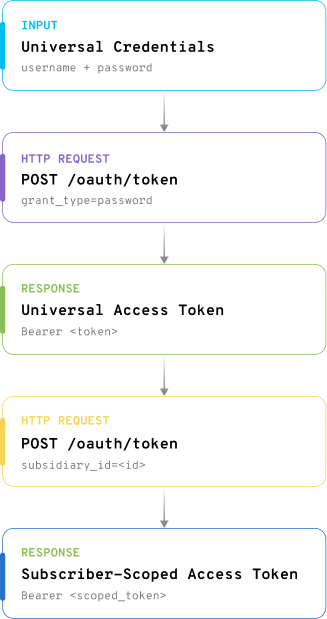
Universal subscriber users with access to multiple accounts can authenticate into a specific child subscriber through POST /oauth/token. Authentication into a child subscriber account requires the following key steps:
- Step 1: Send the
POST /oauth/tokenwith your universal credentials: username and password for the ServiceChannel account to obtain theaccess_token. - Step 2: Use the retrieved
access_tokento send anotherPOST /oauth/tokenrequest with thesubsidiary_idin the request body. Thesubsidiary_idrepresents the ID of the child subscriber that you can obtain via GET /subscribers/current/subsidiaries. The second token request scopes authentication to a specific subscriber account, ensuring API requests are executed in the correct tenant context. - Step 3: Apply the returned
access_tokenscoped to that specific subscriber account for all subsequent API calls.
Prerequisites
- Universal ServiceChannel account credentials
- Valid API
client_idandclient_secret - Access to one or more child subscriber accounts
- Permission to retrieve subsidiary IDs
Step 1. Send a POST request to get access_token
POST /oauth/token
| Header | Value | Note |
|---|---|---|
| Authorization | Basic {encoded client_id:client_secret} |
Replace with your encoded client_id:client_secret |
| Content-Type | application/x-www-form-urlencoded |
| Parameter | Parameter type | Value | Note |
|---|---|---|---|
| username | Body | SC-Dev1.univ | Replace with your universal username |
| password | Body | servicechannel1 | Replace with your universal account password |
| grant_type | Body | password |
Example request:
POST https://sb2login.servicechannel.com/oauth/token HTTP/1.1
Authorization: Basic U0IuM...JGNzQ1
Content-Type: application/x-www-form-urlencoded

username=SC-Dev1.univ&password=servicechannel1&grant_type=password
Example response:
{
    "access_token": "AAEAA...sF-SfBLw",
    "token_type": "bearer",
    "expires_in": 600,
    "refresh_token": "iv8W!...dRkpKQ",
    "scope": "<scope>"
}
Response code: HTTP/1.1 200 OK
The response body contains access_token that you need to authorize calls to the ServiceChannel API.
Step 2. Pass the subsidiary_id in the request body
POST /oauth/token
| Header | Value | Note |
|---|---|---|
| Authorization | Bearer {access_token} | Replace with the retrieved access_token. |
| Content-Type | application/x-www-form-urlencoded |
| Parameter | Parameter type | Value | Note |
|---|---|---|---|
| subsidiary_id | Body | 2014286823 | Replace with the child subscriber ID. Required only when authenticating into a child subscriber account. |
Example request:
POST https://sb2login.servicechannel.com/oauth/token HTTP/1.1
Authorization: Bearer AAEAA...sF-SfBLw
Content-Type: application/x-www-form-urlencoded

subsidiary_id=2014286823
Example response:
{
    "access_token": "AAEAA...EME6aQ",
    "token_type": "bearer",
    "expires_in": 600,
    "refresh_token": "iv8W!...5u_2MXcg",
    "scope": "<scope>"
}
Response code: HTTP/1.1 200 OK
You can now apply the returned access_token (scoped to that specific subscriber account) for all subsequent API calls.
Authentication and Authorization to the ContractorTools API
We use the JWT tokens with Bearer type for authorization to the ContractorTools API. No grant types are required.
Follow these steps to learn how to authenticate your app and access the ContractorTools API:
Step 1. Register Your App
Register your application to get client_id, client_secret, and callback URI.
See App Registration for detailed instructions.
Step 2. Encode App Credentials
Encode your application credentials to securely use them in the next step. Combine your client_id and client_secret, separate them with a colon :, and Base64 encode the combined values.
To encode client_id and client_secret:
- Open any base64 encoder, for example, base64encode.org.
- Insert
client_id:client_secretinto the field, and click ENCODE. Here is an input example:SB.2014917243.70943550-9974-41E7-8B38-CA8C8C024262:1C600CB7-4D24-4787-BB3E-ACD2B2FBF745Important: Make sure there are no spaces or other unnecessary characters in the input field.
- Save the encoded string — you will need it in the next step. This is our output example:
U0IuMjAxNDkxNzI0My43MDk0MzU1MC05OTc0LTQxRTctOEIzOC1DQThDOEMwMjQyNjI6MUM2MDBDQjctNEQyNC00Nzg3LUJCM0UtQUNEMkIyRkJGNzQ1
Step 3. Obtain Authorization
Request access_token
Important: The maximum expiration time of the access token is 4 hours (for subscriber users this value can be less and equal to Inactivity Timeout value from the Admin settings).
To get access_token, send a POST request:
POST /jwt/token
| Header | Value |
|---|---|
| Authorization | Basic U0IuMjAxNDkxNzI0My43MDk0MzU1MC05OTc0LTQxRTctOEIzOC1DQThDOEMwMjQyNjI6MUM2MDBDQjctNEQyNC00Nzg3LUJCM0UtQUNEMkIyRkJGNzQ1 |
| Content-Type | application/x-www-form-urlencoded |
| Parameter | Parameter type | Value | Note |
|---|---|---|---|
| username | Body | TestApi1 | Replace with your username |
| password | Body | TestApi123 | Replace with your password |
Example request:
POST https://sb2login.servicechannel.com/jwt/token HTTP/1.1
Authorization: Basic U0IuMjAxNDkxNzI0My43MDk0MzU1MC05OTc0LTQxRTctOEIzOC1DQThDOEMwMjQyNjI6MUM2MDBDQjctNEQyNC00Nzg3LUJCM0UtQUNEMkIyRkJGNzQ1
Content-Type: application/x-www-form-urlencoded

username=TestApi1&password=TestApi123
Example response:
{
    "access_token": "eyJhbGciOiJkaXIiLCJlbmMiOiJBMTI4Q0JDLUhTMjU2IiwidHlwIjoiSldUIn0..N-P-KwibW-8vf0K8qV-L_Q.6I1XjUY1kgwW__6Z7oSRRKuW93ss31oc1n5kP-0gDmHpnVxNGd9j84k9hN5QNGXfx_-kP-evcYaEE7ayEGvMdfkCILZToLQKqrMtBJk_xM9sfjXcol1ccn0B6adsEmO7jpJkSHmaecHa0aHQvQBwc3wg2y59ET2yX9jQwrwd8A73oHJKcWpHtwGLN7qUGwK1gUj0rNCVJehUx7QQNdT1HaNFn0WjKVHj91gzCGdQuGg09hVGRNBdeg-mqyjTnd_Z3AlPCL5omMD4tG2npvpa1lwjaR70kce09La6tbLqGwIq5QP_T9P_HA0Rbf1oTGdOJ68iCGhmVIHN_Qy2Umn1Bv1wRi0FgV3zfiuLMrkBxPPwl1n11oQjR0meybbvG2Visv5HzcEVaOfZFokyqQi2lDP5uq0DVBax601QegFjefe08EjluAa6WB8w8m_uFZdOqau9G7aqjjLJy3uACfFugKItN20fuANJ3sRL-y7LI0sTUcpzWTNr0USr0fY6lt_6BYMvUmJa2efxZCMEMTkDCmOZzu3DDbarU689LfQc8TN4cglkaDHZz796OJvCNfMHnCZyz_FgVl1wAyfmb314HE1YnwDXKaFpCAyY1uW4W-8pS_jPyeOygMUManJyqWTF3toJr7ATSwv_43SRkw9BEUzbS1LtuTeZFsPrKbef4u4ycW7iZPGNraIknwOD1Y-o2fp5G7Q288G28oawJRyF26Q0WvQWnvQna4Vp99r4tu3ijd0RI4yA4KzqQdX68hxthCuzGFkl-lk_KbJPlLZwJ8CNXYKGLruAEYmXtwSAHBjOtLD533votlz3kHeYmNBrrb1vV7iS4Qs5MneuowATqV_h7e_aqwWl_-gKQeS2Ib_FuvxuzZbZ5mhIpVt9dcI1UFo0iRKY2TBFrVp9zTPjXOpOWDRArNEpYS2ZK0F7-ZTnWhheZehWX8-kK5znxGHxXBVjG6DJipXt6kGFrPpbyRoBrIQCOjgDdEBo7-g0xoVJ9y7RXt79wRBNxKAzFR9sdiODb99IIzzC3hHI0In6JjKO0_pM9n2a81XDw-f3CZXg5KNvAchn2hXsNnBN08MIR4W2byf-IlkF9f7PkPx61fR7CrDpYLk6_SP4u7sFRzAStmuJn6VW09Ra_NHxZ2HF6a9qmyHj3I-vG__ZeGYcHRHUQPIz0c9mtlqPkHqkDl3rDMmMC9wH7zwhkuGl1jDaNoloL4hP1cKXxAhsru-EH5aDhGadujiHx2us3PzD4o_ntxLvaEpk0XuNGdiL8YViU4UWLkj1SLef-4HA1otU494dWOcxbIDVvRnqmObuUrvSZ5fTiTMUoXbNjNqXxeLBT3jsYce3d-n188u-e1Nin169F8TSQGOMGe8fXDfagPGt-pci1rPW6OLfo-qEIyXBIDvvuYkBO74C16rmjwxuU7JGRfToi_3XVnxawAS4PNTtUHagF24taFglDyKXYjNVoavCdbFJZKf-3nHRDhVx_pL75tKsSMs-EQ2a7L5uFsqmIZBJ-syhy_xKBnV0bGs4RQGqauQlCRLEo9X25gZr7aYDjd8gWFSeArIxtDCKLtx_gUXULE_p8PXqv3rupDPnyNiN8ZDJxIBYvNG9bQhJ_a763fTIUyyn7QV6K1BdczOiQqPo8UHBjcpfuZ6d5m-cgvt8jW2E4Sg2bCmTSWNJ96jEAIa_MWxnA9AwqjkxLjSnU4fhJaXfZ3OXQYDvZbGOHf_zrBqDHp-v3nx6A97dX8slwiqrfa9YC4y0SNHO_j3t8sfxWNWcoFRQ12TocsQhzvBWyZZokeAinvN2qZBmTVrr3mzTam4avIqSzrPoUaX47X_Vm6xKBT3V2yyKQokuSGxUz63GNNR4XBoMsnzNw_--PfERpBHmJL8hFk3AcpaiwL6Ww1-0lJcZbAfLM9ok1BCf8uKgNcE44SS37-LfAw.e6NeSYchzJ8FUd_4sWn-bQ",
    "refresh_token": "eyJhbGciOiJkaXIiLCJlbmMiOiJBMTI4Q0JDLUhTMjU2IiwidHlwIjoiSldUIn0..abKyyDIauW9vQmadpPJXyA.lptlcV8dqVHMW07E0IMZRQHyPHMHA6XEvimmozh1Ab5Xh9bzgb2_JccQVT7Aha_4_dlNZPUkwkD31DgHDcB9bKMM3A5cqVdpWZwgeBbPjDCGFdwLpwnlBbcWCqR3kxMbukgbj7CktPn-W4nQ8n7wc40HaU9RChnsQak-lpsSaLagojnjktUZTRd5VdvbLSeRkUIF-Vhzzaw9JrxPfOaL7e8zEr922Z5jjvRozgxulWtRcDWkM3FUMen4Q5AkOCgnLq3G2N_6UpYShHPtGoVCtnIP7QkaxP2-AZjPEOvz5gdciI170CXm5FqR1hFv5FXPZXOldaIAdAqrQu6tX7TUQ3Kuatx0NKz4g8vR7twp2NL5zk7ajnt-nY2lwjeEsqGlWxDsYfgFYC3qh8VZw8XZIWK4vEfajgQV5REJcODqao5lgG5Sh3ywfBw_yvXZro-U7Ve-HR5H3BovA4dqBf5uDjz0DCWAVFy1IdCXFldeAKR89Q6VEN3kBPAAXx1ovQu8cimpdYz351qibAIwAjulXU66KGLrBRxdrBULHdIN7R04DnKNha_CAjvimJAg6eCVEBWG61PbHdX2-ynHY6Jkgfv749gOnX0D4dRRNHqP3OgWKHAHfPTGEvMuwE03sFf51TlLddLWTUYSunN2DkncUck-BFZfLn6e6KJEFn9sAIFgmqugm2IKLMAK03FMusn2DZmQP88zSdYV7wdQ8J6CkAS9RN_R2ZZgwEwAFZUP54ebWvhT2_bAFeA3AfKVLnLtPgu5oMJwpTdqR9KcSTC9DBMo6b89Psx7W6lSmioXY7vfUF0SABYYAWqQgsG6Kv7QzECcH4ToLgoU5hnS-P9HkFFTeyYHITtIuD-2BVzKl7WBYPRDTcow1tFCj0g8pK7rfUzaK0JJMxi061kWOZ_QSylUPj2YDXJNxyWvWAQV1ydFUiYW8NCMw7ahmQYypgNawdTzKngHiMxxgsLsIS3EVQ.fad_c5Zt0b-OWPoIF7_xmw",
    "token_type": "jwt",
    "expires_in": 14400
}
Response code: HTTP/1.1 200 OK
The response body contains access_token that you need to authorize calls to the ContractorTools API.
Step 4. Access Our API
To call the ContractorTools API, you must include the Authorization header with the value Bearer {access_token} in each API request. Unauthorized calls will fail and result in 401 Unauthorized error.
Step 5. Regenerate an Access Token
All things must pass: your access_token expires after a time period set in the expires_in property of the POST /JWT/token response. The time period is set in seconds.
Use refresh_token that you have received with the POST /JWT/token request to generate a new access token.
POST /jwt/token
| Header | Value |
|---|---|
| Authorization | Basic U0IuMjAxNDkxNzI0My43MDk0MzU1MC05OTc0LTQxRTctOEIzOC1DQThDOEMwMjQyNjI6MUM2MDBDQjctNEQyNC00Nzg3LUJCM0UtQUNEMkIyRkJGNzQ1 |
| Content-Type | application/x-www-form-urlencoded |
| Parameter | Parameter type | Value | Note |
|---|---|---|---|
| refresh_token | Body | {refresh_token} |
Replace with your refresh_token |